Top 5 New PC Games in July 2025

Faris Alive

/

5 Minutes

/

Updated

Jul 17, 2025

Summer’s here. Whether you’re traveling, stuck indoors with a fan on full blast, or just enjoying the slower days, it’s the perfect time to discover new PC games that are actually worth your time.

This July 2025 has dropped some seriously exciting stuff, mech shooters, co-op survival, skateboarding nostalgia, and more. If you’ve been tired of your old game library and want something fresh, here’s your sign to jump in.

Below are my top 5 new PC games to play this summer—all fresh releases, all fun, and all playable on-the-go (more on that later).

1. Mecha Break

Genre: Multiplayer Mech Shooter (PvP + PvPvE)
Release: July 2025
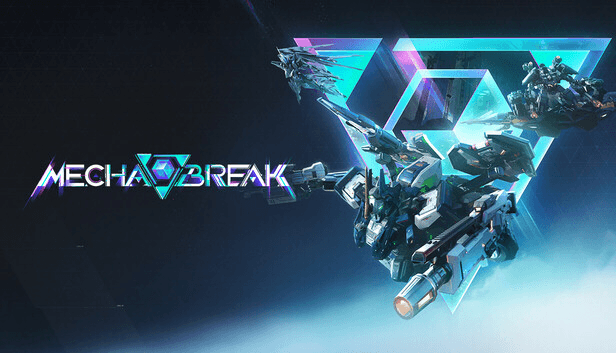
mecha break game

Mecha Break is loud, explosive, and absolutely built for team chaos. It's one of the new PC games this month that’s getting lots of attention—and for good reason. It features deathmatch, hero shooter mechanics, and a unique PvPvE mode on a huge island filled with AI and real players.

What makes it cool:

  • You can pick from different mechs (called Strikers), each with their own class and mods

  • The extraction mode adds strategy beyond just shooting stuff

  • The scale of the map feels like Battlefield, but with robots

It’s definitely a summer pick if you like online team games with style.

2. Wildgate

Genre: Team PvP FPS + Space Combat
Release: July 22, 2025

wildgate game

Among this summer’s top new PC games, Wildgate stands out for blending first-person shooting with starship battles. Yeah, you read that right. You drop into a sci-fi world, loot, fight, hop in ships, and try to outplay the enemy team.

Why it’s worth playing:

  • It’s developed by Dream Haven (founded by an ex-Blizzard veteran)

  • 4v4 team fights feel tight and tactical

  • The shift between FPS and flying is way smoother than you’d expect

This is the kind of new PC game that could easily blow up on Twitch and competitive circles.

3. Abiotic Factor

Genre: Survival Crafting Co-op
Release: July 22, 2025

abiotic factor

This one’s a weird mix in the best way. Abiotic Factor puts you and your friends in the shoes of scientists stuck in a lab gone wrong. Think 90s sci-fi movie, but interactive.

Why it’s one of the best new PC games this summer:

  • You choose a role (like a chemist or engineer) that actually changes how you survive

  • The co-op aspect is really well done—each player’s specialty matters

  • It’s got strong early access feedback and now it’s launching full

If you like games like The Forest, Valheim, or Half-Life-style settings, this is a must-play.

4. Grounded 2

Genre: Co-op Survival
Release: July 29, 2025 (Early Access)

grounded 2

Another new PC game continuing a beloved title Grounded 2 takes everything good from the first game and builds on it. You’re still tiny and fighting to survive in someone’s backyard, but now with insect mounts, better crafting, and more wild zones to explore.

What’s better:

  • Insect-riding makes exploring way more fun

  • New hazards and building systems add depth

  • Still supports 4-player co-op, so it’s perfect for summer hangouts

This one’s great for players who love survival but want something quirky and light-hearted.

5. Tony Hawk’s Pro Skater 3 + 4 Remake

Genre: Skateboarding / Action
Release: July 2025

tonyhawks game


One of the most nostalgic new PC games of the year. These remakes take everything you loved from the early 2000s and give them a clean, modern finish—plus online multiplayer and bonus features.

Why it rocks:

  • Quick and addictive gameplay

  • Remastered visuals and soundtrack

  • Chill enough to play during breaks or before bed

It’s pick-up-and-play perfection, especially during lazy summer afternoons.

Honorable Mentions (More New PC Games to Watch)

Couldn’t fit these into the main five, but they’re still part of July’s solid lineup of new PC games:

  • Striden – Looter shooter with base defense mechanics.

  • Wu Chang: Fallen Feathers – Soulslike RPG with madness mechanics and deep combat.

  • Stronghold Crusader Definitive Edition – Remaster of the classic castle siege RTS.

  • Vault Breakers (Beta) – Extraction-based game with fast combat.

  • Crosswind (Beta) – Pirate survival game with PvP and procedural maps.

If you’re into multiplayer, crafting, or intense action, these new PC games are worth keeping on your radar.

Related reading:

How I’m Playing All These New PC Games on Android

Here’s the twist—I’m not always at my desk to play these. I’ve been playing most of these new PC games on Android, using DeskIn to stream directly from my PC to my phone.

Why that’s awesome:

  • I can game from anywhere: couch, bed, or while traveling

  • No need to buy separate mobile versions

  • It works with controllers or touch—your call

Just install Deskin on your PC and phone, link them up, and boom—your PC library is now portable.

Click here to learn more about Deskin Game Mode

If you’re someone who loves playing on-the-go or just hates being tied to a desk, this makes a huge difference. Especially during summer, when you wanna move around but still play the top PC games of the season.

Final Thoughts

July 2025 is delivering one of the best months in recent memory for new PC games. Whether you want action, co-op survival, or something to casually skate through—there’s something new and exciting out right now.

And if you're like me and wanna play PC games on Android, Deskin has made that easier than ever. You don’t need to wait for mobile ports or stay stuck at your setup.

Which of these games are you trying first?Want to take them with you? Grab the DeskIn free trial and turn your phone into a full-on gaming device.

Summer’s here. Whether you’re traveling, stuck indoors with a fan on full blast, or just enjoying the slower days, it’s the perfect time to discover new PC games that are actually worth your time.

This July 2025 has dropped some seriously exciting stuff, mech shooters, co-op survival, skateboarding nostalgia, and more. If you’ve been tired of your old game library and want something fresh, here’s your sign to jump in.

Below are my top 5 new PC games to play this summer—all fresh releases, all fun, and all playable on-the-go (more on that later).

1. Mecha Break

Genre: Multiplayer Mech Shooter (PvP + PvPvE)
Release: July 2025

mecha break game

Mecha Break is loud, explosive, and absolutely built for team chaos. It's one of the new PC games this month that’s getting lots of attention—and for good reason. It features deathmatch, hero shooter mechanics, and a unique PvPvE mode on a huge island filled with AI and real players.

What makes it cool:

  • You can pick from different mechs (called Strikers), each with their own class and mods

  • The extraction mode adds strategy beyond just shooting stuff

  • The scale of the map feels like Battlefield, but with robots

It’s definitely a summer pick if you like online team games with style.

2. Wildgate

Genre: Team PvP FPS + Space Combat
Release: July 22, 2025

wildgate game

Among this summer’s top new PC games, Wildgate stands out for blending first-person shooting with starship battles. Yeah, you read that right. You drop into a sci-fi world, loot, fight, hop in ships, and try to outplay the enemy team.

Why it’s worth playing:

  • It’s developed by Dream Haven (founded by an ex-Blizzard veteran)

  • 4v4 team fights feel tight and tactical

  • The shift between FPS and flying is way smoother than you’d expect

This is the kind of new PC game that could easily blow up on Twitch and competitive circles.

3. Abiotic Factor

Genre: Survival Crafting Co-op
Release: July 22, 2025

abiotic factor

This one’s a weird mix in the best way. Abiotic Factor puts you and your friends in the shoes of scientists stuck in a lab gone wrong. Think 90s sci-fi movie, but interactive.

Why it’s one of the best new PC games this summer:

  • You choose a role (like a chemist or engineer) that actually changes how you survive

  • The co-op aspect is really well done—each player’s specialty matters

  • It’s got strong early access feedback and now it’s launching full

If you like games like The Forest, Valheim, or Half-Life-style settings, this is a must-play.

4. Grounded 2

Genre: Co-op Survival
Release: July 29, 2025 (Early Access)

grounded 2

Another new PC game continuing a beloved title Grounded 2 takes everything good from the first game and builds on it. You’re still tiny and fighting to survive in someone’s backyard, but now with insect mounts, better crafting, and more wild zones to explore.

What’s better:

  • Insect-riding makes exploring way more fun

  • New hazards and building systems add depth

  • Still supports 4-player co-op, so it’s perfect for summer hangouts

This one’s great for players who love survival but want something quirky and light-hearted.

5. Tony Hawk’s Pro Skater 3 + 4 Remake

Genre: Skateboarding / Action
Release: July 2025

tonyhawks game


One of the most nostalgic new PC games of the year. These remakes take everything you loved from the early 2000s and give them a clean, modern finish—plus online multiplayer and bonus features.

Why it rocks:

  • Quick and addictive gameplay

  • Remastered visuals and soundtrack

  • Chill enough to play during breaks or before bed

It’s pick-up-and-play perfection, especially during lazy summer afternoons.

Honorable Mentions (More New PC Games to Watch)

Couldn’t fit these into the main five, but they’re still part of July’s solid lineup of new PC games:

  • Striden – Looter shooter with base defense mechanics.

  • Wu Chang: Fallen Feathers – Soulslike RPG with madness mechanics and deep combat.

  • Stronghold Crusader Definitive Edition – Remaster of the classic castle siege RTS.

  • Vault Breakers (Beta) – Extraction-based game with fast combat.

  • Crosswind (Beta) – Pirate survival game with PvP and procedural maps.

If you’re into multiplayer, crafting, or intense action, these new PC games are worth keeping on your radar.

Related reading:

How I’m Playing All These New PC Games on Android

Here’s the twist—I’m not always at my desk to play these. I’ve been playing most of these new PC games on Android, using DeskIn to stream directly from my PC to my phone.

Why that’s awesome:

  • I can game from anywhere: couch, bed, or while traveling

  • No need to buy separate mobile versions

  • It works with controllers or touch—your call

Just install Deskin on your PC and phone, link them up, and boom—your PC library is now portable.

Click here to learn more about Deskin Game Mode

If you’re someone who loves playing on-the-go or just hates being tied to a desk, this makes a huge difference. Especially during summer, when you wanna move around but still play the top PC games of the season.

Final Thoughts

July 2025 is delivering one of the best months in recent memory for new PC games. Whether you want action, co-op survival, or something to casually skate through—there’s something new and exciting out right now.

And if you're like me and wanna play PC games on Android, Deskin has made that easier than ever. You don’t need to wait for mobile ports or stay stuck at your setup.

Which of these games are you trying first?Want to take them with you? Grab the DeskIn free trial and turn your phone into a full-on gaming device.

Play x Work
All at Once

LIMITED SALE 9.9 - 9.16

LIMITED SALE 9.9 - 9.16

DeskIn Remote Game

only $14.32 USD 🎉 Limited on July 16-31

Add promo code: deskinsummer1

DeskIn Performance

Over 70% OFF

Yearly Plan Only $12.49/Month

Use Promo Code: DESKIN50

DeskIn Performance

Over 70% OFF

Yearly Plan Only $12.49/Month

Use Promo Code: DESKIN50

top 5 new pc games
top 5 new pc games
top 5 new pc games

Table of Contents

LIMITED SALE 9.9 - 9.16

DeskIn Performance

Over 70% OFF

Yearly Plan Only $12.49/Month

Use Promo Code: DESKIN50

What’s next?

Developers work smarter with remote desktop

How Remote Desktop Can Help App and Game Developers Work Smarter

In today’s fast-growing digital era, companies are constantly building applications to simplify workflows and boost productivity. From software developers to game studios, the demand for remote access solutions is skyrocketing. Teams need tools that allow them to work seamlessly across different locations while keeping efficiency and collaboration high.

DeskIn: High-Performance Remote Access for Every Need

One of the best solutions for remote access is DeskIn—a remote desktop tool designed to deliver top-tier performance for professionals, developers, and even gamers. Unlike basic remote desktop tools, DeskIn is built for multi-purpose use. Whether you’re debugging an app, managing a design project, or testing games, DeskIn ensures smooth remote access without lag or downtime. With powerful servers, DeskIn provides up to 144fps in 2K true color, giving you a real-time experience that feels just like working on your main machine.

In this article, we’ll explore how DeskIn can simplify development, enhance collaboration, and cut costs for teams who rely heavily on remote access.

Why DeskIn Remote Access Stands Out for Developers & Game Studios

In game and app development, every detail matters. DeskIn equips teams with the essential tools to achieve smooth and secure remote access:

  1. 2K True Color Mirroring & Extending
    Accurate visuals are critical for design and testing. With 2K mirroring and extending, developers can enjoy crystal-clear quality through remote access, making it easy to review graphics, UI, and animations as if they were working directly on a high-end workstation.

  2. Root-Free Android Control
    DeskIn offers remote access to Android devices without requiring root. This makes it perfect for mobile app developers who need to test applications safely and quickly, avoiding complicated setup or risks.

  3. Ultra-Low Latency & Fast File Transfer
    With less than 40ms latency, DeskIn ensures your remote access feels instant—ideal for real-time debugging or game testing. On top of that, DeskIn enables file transfer up to 12 MB/s, so moving large project files across devices is fast and effortless.

  4. Scale Up to 100 Devices
    Teams often need to manage multiple workstations. DeskIn supports remote access for up to 100 devices under one ecosystem, making it easy to scale operations for larger development teams or studios.

  5. Enterprise-Grade Security
    Security is non-negotiable in remote access. DeskIn protects all connections with 256-bit encryption, the same standard used in financial systems, ensuring sensitive projects and client data remain safe at all times.

  6. Cost Efficiency & Flexibility
    With DeskIn, teams no longer need high-end hardware for every member. Even from a lightweight laptop or tablet, users can access powerful workstations remotely. This flexibility reduces costs without sacrificing performance, making remote access both effective and economical.

Conclusion

DeskIn is more than just a remote desktop—it’s a complete remote access solution designed to meet modern productivity needs. From ultra-low latency and secure connections to Android control and large-scale device support, DeskIn empowers developers, IT teams, and creative professionals to work anywhere, anytime.

For application developers, game studios, and professionals looking for reliable remote access, DeskIn offers the perfect balance of speed, security, and cost efficiency.

Get start your DeskIn remote access

Developers work smarter with remote desktop

How Remote Desktop Can Help App and Game Developers Work Smarter

In today’s fast-growing digital era, companies are constantly building applications to simplify workflows and boost productivity. From software developers to game studios, the demand for remote access solutions is skyrocketing. Teams need tools that allow them to work seamlessly across different locations while keeping efficiency and collaboration high.

DeskIn: High-Performance Remote Access for Every Need

One of the best solutions for remote access is DeskIn—a remote desktop tool designed to deliver top-tier performance for professionals, developers, and even gamers. Unlike basic remote desktop tools, DeskIn is built for multi-purpose use. Whether you’re debugging an app, managing a design project, or testing games, DeskIn ensures smooth remote access without lag or downtime. With powerful servers, DeskIn provides up to 144fps in 2K true color, giving you a real-time experience that feels just like working on your main machine.

In this article, we’ll explore how DeskIn can simplify development, enhance collaboration, and cut costs for teams who rely heavily on remote access.

Why DeskIn Remote Access Stands Out for Developers & Game Studios

In game and app development, every detail matters. DeskIn equips teams with the essential tools to achieve smooth and secure remote access:

  1. 2K True Color Mirroring & Extending
    Accurate visuals are critical for design and testing. With 2K mirroring and extending, developers can enjoy crystal-clear quality through remote access, making it easy to review graphics, UI, and animations as if they were working directly on a high-end workstation.

  2. Root-Free Android Control
    DeskIn offers remote access to Android devices without requiring root. This makes it perfect for mobile app developers who need to test applications safely and quickly, avoiding complicated setup or risks.

  3. Ultra-Low Latency & Fast File Transfer
    With less than 40ms latency, DeskIn ensures your remote access feels instant—ideal for real-time debugging or game testing. On top of that, DeskIn enables file transfer up to 12 MB/s, so moving large project files across devices is fast and effortless.

  4. Scale Up to 100 Devices
    Teams often need to manage multiple workstations. DeskIn supports remote access for up to 100 devices under one ecosystem, making it easy to scale operations for larger development teams or studios.

  5. Enterprise-Grade Security
    Security is non-negotiable in remote access. DeskIn protects all connections with 256-bit encryption, the same standard used in financial systems, ensuring sensitive projects and client data remain safe at all times.

  6. Cost Efficiency & Flexibility
    With DeskIn, teams no longer need high-end hardware for every member. Even from a lightweight laptop or tablet, users can access powerful workstations remotely. This flexibility reduces costs without sacrificing performance, making remote access both effective and economical.

Conclusion

DeskIn is more than just a remote desktop—it’s a complete remote access solution designed to meet modern productivity needs. From ultra-low latency and secure connections to Android control and large-scale device support, DeskIn empowers developers, IT teams, and creative professionals to work anywhere, anytime.

For application developers, game studios, and professionals looking for reliable remote access, DeskIn offers the perfect balance of speed, security, and cost efficiency.

Get start your DeskIn remote access

dental using remote desktop

Transforming Dental CAD Workflows: How Village Denture Studio Leveraged DeskIn for Seamless Remote Access

In today’s fast-paced digital landscape, the ability to work seamlessly from anywhere has become essential—especially for industries that rely on high-performance design software. For dental labs, where precision and efficiency are critical, finding the right remote access solution can make all the difference.

Background

Village Denture Studio is a specialized dental lab comprising four Clinical Dental Technicians and a dedicated technician specializing in dental CAD design. With five professionals sharing access to CAD workstations across multiple clinics at varying times, the team faced challenges in accessing their design workstations remotely. The need for seamless and efficient remote access became increasingly apparent as the team sought to enhance their workflow and productivity.

Challenges

Initially, the team utilized Splashtop Pro for remote access. However, they encountered issues such as lag and a lack of smoothness, which hindered their ability to perform intricate CAD design tasks remotely.

Implementation

DeskIn was installed on all CAD PCs, enabling staff to remotely access their workstations from home computers. This setup proved particularly beneficial for team members who travel frequently, allowing them to access CAD PCs from various devices, including MacBooks.

Results

The integration of DeskIn allowed the team to utilize their CAD PCs more efficiently without location constraints. DeskIn's ultra-low latency and seamless integration allowed the technicians to access CAD workstations remotely without compromising on performance. This advancement meant that design work could be done from various locations, whether at home, during travel, or from different clinics, without the need to be physically present at the lab.The seamless experience made it feel as if they were working directly on the actual computer, despite being remote.

Transforming the Work Environment

The adoption of DeskIn has significantly transformed the studio's workflow:

  • Increased Accessibility: Technicians can now access CAD systems from any location, facilitating flexible work arrangements and reducing the need for commuting.

  • Cost Efficiency: The need to purchase additional CAD workstations for each technician has been eliminated, leading to cost savings for the studio.

  • Improved Work-Life Balance: Technicians can manage their work schedules more effectively, balancing professional responsibilities with personal commitments.

Community Impact

Recently, during an industry course, a team member had the opportunity to demonstrate DeskIn to fellow dental professionals while discussing remote work solutions. Colleagues were genuinely surprised and impressed by the performance, particularly considering that the CAD software is traditionally PC-only. Many expected the experience to be laggy or difficult on a MacBook, but DeskIn’s responsiveness exceeded expectations.

They commented on how smooth and intuitive the remote workflow felt, remarking that it was almost indistinguishable from working directly on the CAD PC itself. Several attendees noted that this could radically change how dental labs manage CAD operations, enabling flexible work arrangements and remote collaboration in ways they had not considered before. The demonstration sparked conversations about adopting similar solutions in their own practices, highlighting DeskIn’s potential industry-wide impact.

Future Outlook

Looking ahead, DeskIn supports the studio's growth plans. The team no longer anticipates the need to purchase separate CAD PCs for each staff member. Instead, they can efficiently use DeskIn to remotely access existing PCs, optimizing resource utilization and maintaining flexibility.

This success story highlights how DeskIn transformed Village Denture Studio's CAD design workflow, enabling remote access, enhancing efficiency, and supporting future growth.


Read More Case Study: 

dental using remote desktop

Transforming Dental CAD Workflows: How Village Denture Studio Leveraged DeskIn for Seamless Remote Access

In today’s fast-paced digital landscape, the ability to work seamlessly from anywhere has become essential—especially for industries that rely on high-performance design software. For dental labs, where precision and efficiency are critical, finding the right remote access solution can make all the difference.

Background

Village Denture Studio is a specialized dental lab comprising four Clinical Dental Technicians and a dedicated technician specializing in dental CAD design. With five professionals sharing access to CAD workstations across multiple clinics at varying times, the team faced challenges in accessing their design workstations remotely. The need for seamless and efficient remote access became increasingly apparent as the team sought to enhance their workflow and productivity.

Challenges

Initially, the team utilized Splashtop Pro for remote access. However, they encountered issues such as lag and a lack of smoothness, which hindered their ability to perform intricate CAD design tasks remotely.

Implementation

DeskIn was installed on all CAD PCs, enabling staff to remotely access their workstations from home computers. This setup proved particularly beneficial for team members who travel frequently, allowing them to access CAD PCs from various devices, including MacBooks.

Results

The integration of DeskIn allowed the team to utilize their CAD PCs more efficiently without location constraints. DeskIn's ultra-low latency and seamless integration allowed the technicians to access CAD workstations remotely without compromising on performance. This advancement meant that design work could be done from various locations, whether at home, during travel, or from different clinics, without the need to be physically present at the lab.The seamless experience made it feel as if they were working directly on the actual computer, despite being remote.

Transforming the Work Environment

The adoption of DeskIn has significantly transformed the studio's workflow:

  • Increased Accessibility: Technicians can now access CAD systems from any location, facilitating flexible work arrangements and reducing the need for commuting.

  • Cost Efficiency: The need to purchase additional CAD workstations for each technician has been eliminated, leading to cost savings for the studio.

  • Improved Work-Life Balance: Technicians can manage their work schedules more effectively, balancing professional responsibilities with personal commitments.

Community Impact

Recently, during an industry course, a team member had the opportunity to demonstrate DeskIn to fellow dental professionals while discussing remote work solutions. Colleagues were genuinely surprised and impressed by the performance, particularly considering that the CAD software is traditionally PC-only. Many expected the experience to be laggy or difficult on a MacBook, but DeskIn’s responsiveness exceeded expectations.

They commented on how smooth and intuitive the remote workflow felt, remarking that it was almost indistinguishable from working directly on the CAD PC itself. Several attendees noted that this could radically change how dental labs manage CAD operations, enabling flexible work arrangements and remote collaboration in ways they had not considered before. The demonstration sparked conversations about adopting similar solutions in their own practices, highlighting DeskIn’s potential industry-wide impact.

Future Outlook

Looking ahead, DeskIn supports the studio's growth plans. The team no longer anticipates the need to purchase separate CAD PCs for each staff member. Instead, they can efficiently use DeskIn to remotely access existing PCs, optimizing resource utilization and maintaining flexibility.

This success story highlights how DeskIn transformed Village Denture Studio's CAD design workflow, enabling remote access, enhancing efficiency, and supporting future growth.


Read More Case Study: 

play gtav on mobile device

How to Play GTA V on Mobile: The Ultimate Guide for Gaming on the Go

Can you play GTA V on mobile? It's a question that haunts every mobile gamer who's ever wanted to cruise through Los Santos on their phone.

If you're tired of waiting for Rockstar to officially bring GTA V to mobile, or you've tried sketchy workarounds that left your device vulnerable, here's some good news: there's a legit way to play GTA V on your phone or tablet. And it's smoother than Franklin's driving skills.

Let me show you why playing GTA V on mobile seemed impossible — and how a smart remote gaming solution called Deskin turns your mobile device into a portable Los Santos gateway.

interface gta v on mobile device

The Reality Check: Why GTA V Mobile Doesn't Exist (Yet)

Here's the truth bomb: Rockstar Games has never released an official GTA V mobile port. Despite the massive success of GTA San Andreas and Vice City on mobile platforms, GTA V remains locked to PC, PlayStation, and Xbox.

Why? The game is massive. We're talking about a 100+ GB install with graphics that push even high-end PCs to their limits. Mobile hardware, while impressive, isn't quite ready for that level of chaos.

The numbers tell the story:

  • GTA V requires 8GB RAM minimum on PC

  • Most mobile devices have 4-8GB RAM total

  • The game's graphics engine demands dedicated GPU power that mobile chips can't match

But here's where it gets interesting. While you can't install GTA V directly on mobile, you can absolutely play it on your phone or tablet using remote gaming technology.

Method 1: Cloud Gaming Services - Rent Gaming Power

Cloud gaming flips the script entirely. Instead of using your own PC, you rent gaming power from services like GeForce NOW, Xbox Cloud Gaming, or PlayStation Now.

The appeal: No gaming PC required. Just sign up, log in through your browser or app, and start playing GTA V on virtually any device with internet.

The reality:

  • Latency issues: Even with great internet, there's noticeable input delay

  • Cost factor: Most services charge $10-20 monthly after free trials

  • Queue times: Popular games often have wait times during peak hours

  • Data usage: Streaming HD games can burn through mobile data fast

Performance stats from real users:

  • Average latency: 80-150ms (compared to 20-40ms for local remote gaming)

  • Monthly data usage: 10-15GB for casual play

  • Quality drops during peak hours (6-10 PM)

This works for casual gaming sessions, but competitive players will feel every millisecond of delay.

Method 2: Remote Gaming - Stream GTA V from Your PC

This is the golden ticket for mobile GTA V gaming. Instead of trying to cram the entire game onto your phone, you run it on a gaming PC and stream the experience to your mobile device.

How it works: Your gaming PC does all the heavy lifting — rendering graphics, processing physics, handling AI. Your mobile device becomes a smart controller and display, receiving the video stream and sending your inputs back.

What you need:

  • A gaming PC with GTA V installed

  • Stable Wi-Fi connection (5GHz recommended)

  • A remote gaming app like Deskin or Parsec

Performance reality check: With the right setup, you'll get near-native performance. I'm talking about 60fps gameplay with minimal input lag. The key is having solid internet and the right streaming tool.

The biggest advantage? You're playing the full, unmodified version of GTA V. All DLCs, all updates, all the chaos you expect from Los Santos.

Why Deskin beats the competition:

Ultra-low latency streaming: We're talking sub-40ms input lag, which is close to playing locally. That means responsive driving, accurate shooting, and smooth mission gameplay.

4K60FPS or 2K144FPS support: Your mobile device becomes a premium gaming display. Whether you're using an iPhone, iPad, or Android tablet, you get crisp, smooth visuals that do justice to GTA V's graphics.

True controller support: Connect your favorite Bluetooth controller to your mobile device and play GTA V exactly like you would on console. No awkward touch controls, no compromised gameplay.

Works anywhere: As long as you have internet, you can access your gaming PC. Beach vacation? Business trip? Lunch break? Los Santos is always a tap away.

Cross-platform magic: iPhone to Windows PC, Android to Mac, tablet to gaming rig — Deskin connects everything seamlessly.

Want to level up your entire remote gaming setup? Check out how to optimize your gaming keyboard and hotkeys for remote play to get console-level control on mobile.

Getting Started: Your Step-by-Step Setup Guide

Ready to install GTA V on mobile (sort of)? Here's how to set up remote access gaming:

What you'll need:

  • Gaming PC with GTA V installed

  • Mobile device (iOS 12+ or Android 8+)

  • Stable Wi-Fi connection on both devices

  • Deskin app (free download)

Setup process:

setting deskin
  1. Download Deskin on both your PC and mobile device

  2. Sign up or log in using the same account on both devices.

  3. On your phone, open DeskIn, go to “My Devices”, and select your PC.

  4. Enter the password to verify or approve the request manually on your PC.

  5. Tap “Control” to initiate the remote connection.

  6. Adjust resolution and frame rate in the settings for optimal performance.

  7. Launch GTA V on your phone and start playing directly on your PC screen.

  8. Connect a game controller to your mobile device for smoother and more responsive gameplay.

Pro tip: Start with 1080p60fps settings and adjust up or down based on your connection stability. You can always fine-tune later.

The whole setup takes about 10 minutes, and once it's done, launching GTA V on mobile becomes as simple as opening an app.

Performance Tips: Getting the Best Mobile GTA V Experience

Getting smooth gameplay requires the right settings. Here's what actually works:

Network optimization:

  • Use 5GHz Wi-Fi when possible

  • Keep both devices close to your router

  • Close bandwidth-heavy apps on your network

  • Consider ethernet connection for your gaming PC

Quality settings that matter:

  • Start with 1080p60fps for stable performance

  • Bump to 2K if your connection can handle it

  • Prioritize frame rate over resolution for competitive play

  • Enable hardware acceleration on both devices

Controller setup: Most Bluetooth controllers work great with Deskin. Xbox and PlayStation controllers are plug-and-play. The key is pairing the controller to your mobile device, not your PC.

Real user stats:

  • Average setup time: 8-12 minutes

  • Typical latency on good Wi-Fi: 25-35ms

  • Data usage per hour: 1-2GB on high settings

  • Battery life impact: 20-30% more drain than normal mobile gaming

Looking to maximize your setup even further? Learn how to set up dual monitors for gaming to keep Discord, maps, or streaming tools open while you play.

Is This Legal and Safe?

The big question everyone asks: is this allowed?

Short answer: Yes, completely.

You're not pirating, emulating, or modifying anything. You own GTA V on PC, you're running it on your own hardware, and you're simply viewing it on a different screen. It's like using a wireless monitor — totally legitimate.

Why it's safe:

  • No game file modifications

  • No bypass of copy protection

  • No violation of Rockstar's terms of service

  • Uses standard remote access protocols

Privacy protection: Deskin uses encrypted connections between your devices. Your gaming sessions stay private, and no data passes through third-party servers during gameplay.

Get started with Deskin today and turn any screen into your personal gateway to Los Santos. Your mobile GTA V adventure starts now.

Download Here

play gtav on mobile device

How to Play GTA V on Mobile: The Ultimate Guide for Gaming on the Go

Can you play GTA V on mobile? It's a question that haunts every mobile gamer who's ever wanted to cruise through Los Santos on their phone.

If you're tired of waiting for Rockstar to officially bring GTA V to mobile, or you've tried sketchy workarounds that left your device vulnerable, here's some good news: there's a legit way to play GTA V on your phone or tablet. And it's smoother than Franklin's driving skills.

Let me show you why playing GTA V on mobile seemed impossible — and how a smart remote gaming solution called Deskin turns your mobile device into a portable Los Santos gateway.

interface gta v on mobile device

The Reality Check: Why GTA V Mobile Doesn't Exist (Yet)

Here's the truth bomb: Rockstar Games has never released an official GTA V mobile port. Despite the massive success of GTA San Andreas and Vice City on mobile platforms, GTA V remains locked to PC, PlayStation, and Xbox.

Why? The game is massive. We're talking about a 100+ GB install with graphics that push even high-end PCs to their limits. Mobile hardware, while impressive, isn't quite ready for that level of chaos.

The numbers tell the story:

  • GTA V requires 8GB RAM minimum on PC

  • Most mobile devices have 4-8GB RAM total

  • The game's graphics engine demands dedicated GPU power that mobile chips can't match

But here's where it gets interesting. While you can't install GTA V directly on mobile, you can absolutely play it on your phone or tablet using remote gaming technology.

Method 1: Cloud Gaming Services - Rent Gaming Power

Cloud gaming flips the script entirely. Instead of using your own PC, you rent gaming power from services like GeForce NOW, Xbox Cloud Gaming, or PlayStation Now.

The appeal: No gaming PC required. Just sign up, log in through your browser or app, and start playing GTA V on virtually any device with internet.

The reality:

  • Latency issues: Even with great internet, there's noticeable input delay

  • Cost factor: Most services charge $10-20 monthly after free trials

  • Queue times: Popular games often have wait times during peak hours

  • Data usage: Streaming HD games can burn through mobile data fast

Performance stats from real users:

  • Average latency: 80-150ms (compared to 20-40ms for local remote gaming)

  • Monthly data usage: 10-15GB for casual play

  • Quality drops during peak hours (6-10 PM)

This works for casual gaming sessions, but competitive players will feel every millisecond of delay.

Method 2: Remote Gaming - Stream GTA V from Your PC

This is the golden ticket for mobile GTA V gaming. Instead of trying to cram the entire game onto your phone, you run it on a gaming PC and stream the experience to your mobile device.

How it works: Your gaming PC does all the heavy lifting — rendering graphics, processing physics, handling AI. Your mobile device becomes a smart controller and display, receiving the video stream and sending your inputs back.

What you need:

  • A gaming PC with GTA V installed

  • Stable Wi-Fi connection (5GHz recommended)

  • A remote gaming app like Deskin or Parsec

Performance reality check: With the right setup, you'll get near-native performance. I'm talking about 60fps gameplay with minimal input lag. The key is having solid internet and the right streaming tool.

The biggest advantage? You're playing the full, unmodified version of GTA V. All DLCs, all updates, all the chaos you expect from Los Santos.

Why Deskin beats the competition:

Ultra-low latency streaming: We're talking sub-40ms input lag, which is close to playing locally. That means responsive driving, accurate shooting, and smooth mission gameplay.

4K60FPS or 2K144FPS support: Your mobile device becomes a premium gaming display. Whether you're using an iPhone, iPad, or Android tablet, you get crisp, smooth visuals that do justice to GTA V's graphics.

True controller support: Connect your favorite Bluetooth controller to your mobile device and play GTA V exactly like you would on console. No awkward touch controls, no compromised gameplay.

Works anywhere: As long as you have internet, you can access your gaming PC. Beach vacation? Business trip? Lunch break? Los Santos is always a tap away.

Cross-platform magic: iPhone to Windows PC, Android to Mac, tablet to gaming rig — Deskin connects everything seamlessly.

Want to level up your entire remote gaming setup? Check out how to optimize your gaming keyboard and hotkeys for remote play to get console-level control on mobile.

Getting Started: Your Step-by-Step Setup Guide

Ready to install GTA V on mobile (sort of)? Here's how to set up remote access gaming:

What you'll need:

  • Gaming PC with GTA V installed

  • Mobile device (iOS 12+ or Android 8+)

  • Stable Wi-Fi connection on both devices

  • Deskin app (free download)

Setup process:

setting deskin
  1. Download Deskin on both your PC and mobile device

  2. Sign up or log in using the same account on both devices.

  3. On your phone, open DeskIn, go to “My Devices”, and select your PC.

  4. Enter the password to verify or approve the request manually on your PC.

  5. Tap “Control” to initiate the remote connection.

  6. Adjust resolution and frame rate in the settings for optimal performance.

  7. Launch GTA V on your phone and start playing directly on your PC screen.

  8. Connect a game controller to your mobile device for smoother and more responsive gameplay.

Pro tip: Start with 1080p60fps settings and adjust up or down based on your connection stability. You can always fine-tune later.

The whole setup takes about 10 minutes, and once it's done, launching GTA V on mobile becomes as simple as opening an app.

Performance Tips: Getting the Best Mobile GTA V Experience

Getting smooth gameplay requires the right settings. Here's what actually works:

Network optimization:

  • Use 5GHz Wi-Fi when possible

  • Keep both devices close to your router

  • Close bandwidth-heavy apps on your network

  • Consider ethernet connection for your gaming PC

Quality settings that matter:

  • Start with 1080p60fps for stable performance

  • Bump to 2K if your connection can handle it

  • Prioritize frame rate over resolution for competitive play

  • Enable hardware acceleration on both devices

Controller setup: Most Bluetooth controllers work great with Deskin. Xbox and PlayStation controllers are plug-and-play. The key is pairing the controller to your mobile device, not your PC.

Real user stats:

  • Average setup time: 8-12 minutes

  • Typical latency on good Wi-Fi: 25-35ms

  • Data usage per hour: 1-2GB on high settings

  • Battery life impact: 20-30% more drain than normal mobile gaming

Looking to maximize your setup even further? Learn how to set up dual monitors for gaming to keep Discord, maps, or streaming tools open while you play.

Is This Legal and Safe?

The big question everyone asks: is this allowed?

Short answer: Yes, completely.

You're not pirating, emulating, or modifying anything. You own GTA V on PC, you're running it on your own hardware, and you're simply viewing it on a different screen. It's like using a wireless monitor — totally legitimate.

Why it's safe:

  • No game file modifications

  • No bypass of copy protection

  • No violation of Rockstar's terms of service

  • Uses standard remote access protocols

Privacy protection: Deskin uses encrypted connections between your devices. Your gaming sessions stay private, and no data passes through third-party servers during gameplay.

Get started with Deskin today and turn any screen into your personal gateway to Los Santos. Your mobile GTA V adventure starts now.

Download Here

Developers work smarter with remote desktop

How Remote Desktop Can Help App and Game Developers Work Smarter

In today’s fast-growing digital era, companies are constantly building applications to simplify workflows and boost productivity. From software developers to game studios, the demand for remote access solutions is skyrocketing. Teams need tools that allow them to work seamlessly across different locations while keeping efficiency and collaboration high.

DeskIn: High-Performance Remote Access for Every Need

One of the best solutions for remote access is DeskIn—a remote desktop tool designed to deliver top-tier performance for professionals, developers, and even gamers. Unlike basic remote desktop tools, DeskIn is built for multi-purpose use. Whether you’re debugging an app, managing a design project, or testing games, DeskIn ensures smooth remote access without lag or downtime. With powerful servers, DeskIn provides up to 144fps in 2K true color, giving you a real-time experience that feels just like working on your main machine.

In this article, we’ll explore how DeskIn can simplify development, enhance collaboration, and cut costs for teams who rely heavily on remote access.

Why DeskIn Remote Access Stands Out for Developers & Game Studios

In game and app development, every detail matters. DeskIn equips teams with the essential tools to achieve smooth and secure remote access:

  1. 2K True Color Mirroring & Extending
    Accurate visuals are critical for design and testing. With 2K mirroring and extending, developers can enjoy crystal-clear quality through remote access, making it easy to review graphics, UI, and animations as if they were working directly on a high-end workstation.

  2. Root-Free Android Control
    DeskIn offers remote access to Android devices without requiring root. This makes it perfect for mobile app developers who need to test applications safely and quickly, avoiding complicated setup or risks.

  3. Ultra-Low Latency & Fast File Transfer
    With less than 40ms latency, DeskIn ensures your remote access feels instant—ideal for real-time debugging or game testing. On top of that, DeskIn enables file transfer up to 12 MB/s, so moving large project files across devices is fast and effortless.

  4. Scale Up to 100 Devices
    Teams often need to manage multiple workstations. DeskIn supports remote access for up to 100 devices under one ecosystem, making it easy to scale operations for larger development teams or studios.

  5. Enterprise-Grade Security
    Security is non-negotiable in remote access. DeskIn protects all connections with 256-bit encryption, the same standard used in financial systems, ensuring sensitive projects and client data remain safe at all times.

  6. Cost Efficiency & Flexibility
    With DeskIn, teams no longer need high-end hardware for every member. Even from a lightweight laptop or tablet, users can access powerful workstations remotely. This flexibility reduces costs without sacrificing performance, making remote access both effective and economical.

Conclusion

DeskIn is more than just a remote desktop—it’s a complete remote access solution designed to meet modern productivity needs. From ultra-low latency and secure connections to Android control and large-scale device support, DeskIn empowers developers, IT teams, and creative professionals to work anywhere, anytime.

For application developers, game studios, and professionals looking for reliable remote access, DeskIn offers the perfect balance of speed, security, and cost efficiency.

Get start your DeskIn remote access

dental using remote desktop

Transforming Dental CAD Workflows: How Village Denture Studio Leveraged DeskIn for Seamless Remote Access

In today’s fast-paced digital landscape, the ability to work seamlessly from anywhere has become essential—especially for industries that rely on high-performance design software. For dental labs, where precision and efficiency are critical, finding the right remote access solution can make all the difference.

Background

Village Denture Studio is a specialized dental lab comprising four Clinical Dental Technicians and a dedicated technician specializing in dental CAD design. With five professionals sharing access to CAD workstations across multiple clinics at varying times, the team faced challenges in accessing their design workstations remotely. The need for seamless and efficient remote access became increasingly apparent as the team sought to enhance their workflow and productivity.

Challenges

Initially, the team utilized Splashtop Pro for remote access. However, they encountered issues such as lag and a lack of smoothness, which hindered their ability to perform intricate CAD design tasks remotely.

Implementation

DeskIn was installed on all CAD PCs, enabling staff to remotely access their workstations from home computers. This setup proved particularly beneficial for team members who travel frequently, allowing them to access CAD PCs from various devices, including MacBooks.

Results

The integration of DeskIn allowed the team to utilize their CAD PCs more efficiently without location constraints. DeskIn's ultra-low latency and seamless integration allowed the technicians to access CAD workstations remotely without compromising on performance. This advancement meant that design work could be done from various locations, whether at home, during travel, or from different clinics, without the need to be physically present at the lab.The seamless experience made it feel as if they were working directly on the actual computer, despite being remote.

Transforming the Work Environment

The adoption of DeskIn has significantly transformed the studio's workflow:

  • Increased Accessibility: Technicians can now access CAD systems from any location, facilitating flexible work arrangements and reducing the need for commuting.

  • Cost Efficiency: The need to purchase additional CAD workstations for each technician has been eliminated, leading to cost savings for the studio.

  • Improved Work-Life Balance: Technicians can manage their work schedules more effectively, balancing professional responsibilities with personal commitments.

Community Impact

Recently, during an industry course, a team member had the opportunity to demonstrate DeskIn to fellow dental professionals while discussing remote work solutions. Colleagues were genuinely surprised and impressed by the performance, particularly considering that the CAD software is traditionally PC-only. Many expected the experience to be laggy or difficult on a MacBook, but DeskIn’s responsiveness exceeded expectations.

They commented on how smooth and intuitive the remote workflow felt, remarking that it was almost indistinguishable from working directly on the CAD PC itself. Several attendees noted that this could radically change how dental labs manage CAD operations, enabling flexible work arrangements and remote collaboration in ways they had not considered before. The demonstration sparked conversations about adopting similar solutions in their own practices, highlighting DeskIn’s potential industry-wide impact.

Future Outlook

Looking ahead, DeskIn supports the studio's growth plans. The team no longer anticipates the need to purchase separate CAD PCs for each staff member. Instead, they can efficiently use DeskIn to remotely access existing PCs, optimizing resource utilization and maintaining flexibility.

This success story highlights how DeskIn transformed Village Denture Studio's CAD design workflow, enabling remote access, enhancing efficiency, and supporting future growth.


Read More Case Study: 

Don't miss out.

Don't miss out.

Don't miss out.

Contact Us

Email: support@deskin.io

Office: 991D Alexandra Road #02-17, Singapore 119972

Copyright © 2025 Zuler Technology PTE. LTD. All rights reserved.

Contact Us

support@deskin.io

991D Alexandra Road #02-17

Singapore 119972

Copyright © 2025 Zuler Technology PTE. LTD. All rights reserved.

Contact Us

Email: support@deskin.io

Office: 991D Alexandra Road #02-17, Singapore 119972

Copyright © 2025 Zuler Technology PTE. LTD. All rights reserved.

Create a free website with Framer, the website builder loved by startups, designers and agencies.